
How to Hide Last Seen in GB WhatsApp?
Privacy is one of the main reasons users choose GB WhatsApp over the official WhatsApp. One of the most popular features in GB WhatsApp is the ability to hide or freeze your “Last Seen” status. This allows you to use the app without others knowing when you were last active.
In this guide, you’ll learn exactly how to hide last seen in GB WhatsApp, how the feature works, and important things you should know before using it.
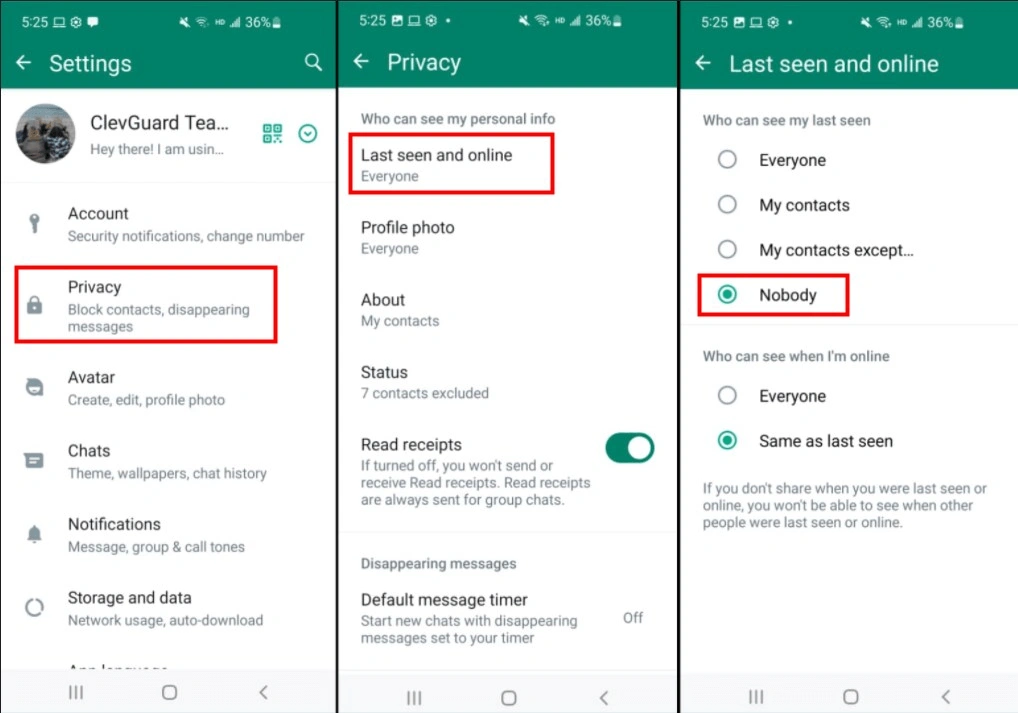
What Does “Last Seen” Mean?
“Last Seen” shows the last time you were active on WhatsApp. For example, under your name, others might see:
Last seen today at 10:45 PM
This lets contacts know when you were last online. While some users don’t mind this, others prefer more privacy and control over their visibility.
Can You Hide Last Seen in GB WhatsApp?
Yes. GB WhatsApp offers more advanced privacy options compared to the official app. You can:
- Hide last seen completely
- Freeze last seen at a specific time
- Hide online status
- Hide typing and recording indicators
These features give users greater flexibility.
Step-by-Step: How to Hide Last Seen in GB WhatsApp
Follow these simple steps on your Android device:
Step 1: Open GB WhatsApp
Launch the GB WhatsApp application on your phone.
Step 2: Access GB Settings
Tap the three-dot menu in the top right corner.
Select GB Settings (this is different from regular WhatsApp settings).
Step 3: Go to Privacy Settings
Inside GB Settings, tap on Privacy & Security.
Step 4: Enable “Freeze Last Seen”
Look for the option labeled Freeze Last Seen and toggle it ON.
Once activated, your last seen time will stay fixed at the time you enabled the feature. Even if you use the app later, others will not see updates.
Alternative Method: Hide Last Seen Completely
Instead of freezing it, you can completely hide your last seen:
- Go to GB Settings
- Tap Privacy & Security
- Select Contacts or Privacy
- Enable Hide Last Seen
This prevents others from seeing any last seen timestamp at all.
What Happens When You Freeze Last Seen?
When you enable Freeze Last Seen:
- Your contacts will see the same last seen time permanently
- You can still read messages
- You can still send messages
- You may not see others’ last seen (depending on settings)
Some versions of GB WhatsApp may limit your ability to see other people’s last seen when yours is hidden.
Hide Last Seen vs Hide Online Status
Many users confuse these two features:
Hide Last Seen
Prevents others from seeing the last time you were active.
Hide Online Status
Prevents others from seeing “Online” when you are actively using the app.
For maximum privacy, you can enable both.
Important Things to Consider
While hiding last seen is convenient, there are some important points:
1. It May Affect Mutual Visibility
In some cases, if you hide your last seen, you may not see others’ last seen either.
2. Risk of Account Ban
GB WhatsApp is a modified app and not officially supported. Using modded features may increase the risk of temporary or permanent bans.
3. Version Differences
Menu names and locations may vary slightly depending on your GB WhatsApp version.
Does This Work on iPhone?
No. GB WhatsApp is designed for Android only. iPhone (iOS) devices do not support APK installation, so this feature is not available on iOS.
Tips for Maximum Privacy in GB WhatsApp
If you want to stay completely private, you can combine these settings:
- Freeze Last Seen
- Hide Online Status
- Hide Blue Ticks
- Hide Second Ticks
- Hide Typing & Recording Status
- Disable “Forwarded” tag
Together, these create a near-invisible messaging experience.
Frequently Asked Questions
Can I unfreeze my last seen later?
Yes. Simply return to Privacy & Security settings and disable “Freeze Last Seen.”
Will my contacts know I hid my last seen?
They won’t receive a notification, but they may notice your last seen is not updating.
Is freezing last seen better than hiding it?
Freezing keeps a fixed time visible, which may look more natural than completely hiding it.
Does hiding last seen affect message delivery?
No. Messages will still be delivered normally.
Final Thoughts
Hiding last seen in GB WhatsApp is quick and easy thanks to built-in privacy tools. Whether you want to freeze your activity time or completely hide it, the app gives you full control over your visibility.
However, remember that GB WhatsApp is not officially supported and carries certain risks. If account security and long-term stability are your priority, consider using the official WhatsApp privacy settings instead.